
El Nuevo Día
GFR MediaNews & Magazines
3.81.83K Reviews
- Version
- 6.0.2
- Installs
- 500.00K
- Age Rating
- Everyone 10+
Screenshots


Our Review of El Nuevo Día
 Analysis by Appyee
I usually open a news app with a practical question in mind: can I get a useful picture of what is happening in Puerto Rico without losing my morning to endless scrolling? El Nuevo Día is built around that local-news need. It is a free news and magazines app from GFR Media, and its focus makes it a more natural starting point for Puerto Rico coverage than a general news aggregator. I would consider it especially useful if local developments are part of your everyday decisions, even when you also follow national or international stories elsewhere.
Starting with a local news habit
The app has been around since 2011, and its current version is 5.21.2. It has an average rating of 3.9 from around 11,000 ratings, with more than half a million installs. Those figures suggest an established audience, though they do not guarantee that every reader will enjoy the experience. I would treat it as a way to follow a particular publication, not as a promise that one app can cover every perspective or answer every question about a developing story.
A typical use case is straightforward: check local headlines before work, return to a story after a conversation raises a question, then catch up on a broader topic later in the day. That routine is where a focused publication app can be more useful than a feed that mixes posts from many sources. The trade-off is that a single outlet naturally gives you a narrower view than a collection of newsrooms. When a story is important or disputed, I would read beyond one source rather than treat any one app as the whole picture.
Features That Stand Out
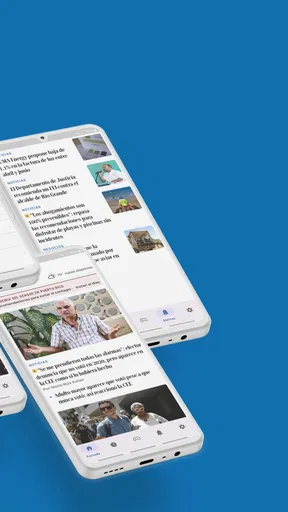
When I first opened El Nuevo Día, the clean and intuitive design immediately caught my eye. The developers have clearly put a lot of thought into making navigation as smooth as possible. Here’s what stood out to me:
- Breaking News Alerts: You’ll never miss a beat with real-time notifications that keep you updated on the latest headlines.
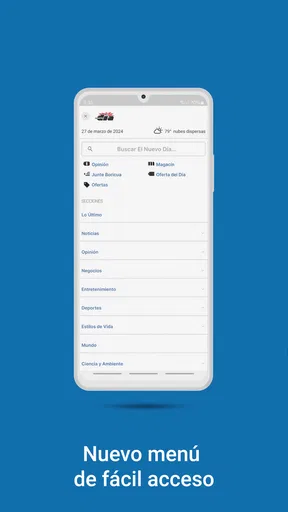
- Customizable Sections: Whether you're into politics, sports, or entertainment, you can tailor the app to show the news that matters most to you.
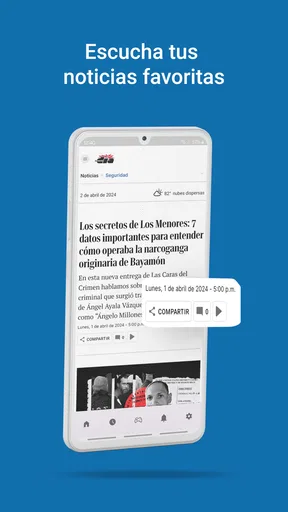
- Multimedia Content: Enjoy a rich experience with videos and photo galleries that bring stories to life.
- Offline Reading: Perfect for those moments when you’re on the go and don’t have access to Wi-Fi. Just download articles and read them later.
Moving from a headline to a useful read
For a more deliberate workflow, I would start with the main headlines rather than trying to read every section. If a story affects a decision—such as planning around a local development or understanding a public issue—I would open the full article, note what it actually establishes, and keep separate questions in mind for later. This sounds simple, but it helps prevent a notification or a striking headline from becoming the entire story in your head.
Notifications can help with timely developments, but they can also interrupt a day that does not need constant updates. I would enable them only if immediate local headlines are genuinely useful to me, then use the phone’s notification controls if the volume becomes distracting. The best alert is one that prompts me to check a story when it matters, not one that turns every quiet moment into another news check.
Customizing sections is most useful when it reflects a real reading routine. Someone who follows local politics for work may want those stories easy to reach, while a reader who checks sports after the day’s main headlines can give that topic a different place in their routine. I would avoid selecting everything just because it is available: a shorter path to the subjects I care about makes it easier to return regularly without turning the app into another crowded feed.
User Experience
Let’s talk about how user-friendly this app is. Navigating El Nuevo Día feels like a breeze. The developers have done an excellent job ensuring that even the least tech-savvy users can find their way around. The search functionality is robust, allowing you to find specific articles in no time.
Search is particularly useful when a topic comes back into the news and I remember only a name or a broad subject. I would use it as a route back to relevant coverage, not assume that a search result alone gives a complete timeline. For a developing issue, comparing the dates and context of several articles matters more than opening the first result and stopping there.
Another thing I loved was the night mode feature. As someone who often reads late into the night, having a darker theme option is a game changer for my tired eyes.
When the story leaves the app
News reading rarely ends at the article. I might hear a claim from a friend, look for coverage in the app, and then explain what I found to someone who does not use it. In that handoff, the article is a useful starting point, but a summary from memory can lose important qualifications. I would share the specific story through whatever sharing option is available in the app, or keep its headline and key details handy, rather than pass along a simplified version as if it were the full report.
Multimedia can help when a photograph or video adds context that plain text cannot convey, but it also asks more of the reader’s attention and connection. If I am on a limited or unreliable connection, I would prioritize reading text first and leave video for later. The offline-reading option described in the app can suit travel or a weak-signal commute, but I would save material before leaving a dependable connection rather than assume every part of a story will be available offline.
That is also where this publication app differs from a general aggregator. An aggregator is convenient when I want a range of publishers in one place; this app is the more direct choice when I want to follow El Nuevo Día’s coverage and sections. Neither approach replaces the other. For a major Puerto Rico story, I would use this app to follow its reporting, then consult other reputable outlets when I need a wider comparison.
Content Quality
In terms of content, El Nuevo Día delivers top-notch journalism. The articles are well-written, informative, and cover a wide range of topics. Whether you're interested in local news or international affairs, you’ll find something that piques your interest.
The editorial team seems committed to providing balanced and comprehensive reporting. It's refreshing to see an app that prioritizes quality journalism, especially in an era where sensationalism often takes center stage.
For readers deciding whether to install it, the practical question is whether a publication-led approach fits how they consume news. If I want a clear home for Puerto Rico coverage and am comfortable choosing one newsroom as my starting point, this is a sensible option. If my main goal is to compare many publishers automatically, or to follow a topic outside the publication’s focus, a broader aggregator or a specialist source may serve me better. I would use both approaches selectively rather than expect one to do every job.
Who it suits, and the points to weigh
The app is free to download, but in-app purchases range from a few dollars to amounts approaching a hundred dollars per item. That makes it worth checking the purchase screen carefully before committing to anything; free installation should not be confused with every possible reading option being free. If you only want to browse what is available without making a purchase, pay attention to any prompt and decide whether the offered access is worth it for your own reading habits.
Its Everyone 10+ age rating also gives families a useful starting point when deciding whether it is appropriate for a younger reader. I would still consider the subject matter of individual news stories and discuss current events with children as needed; a broad age label cannot make every headline suitable for every child. For adults who want regular Puerto Rico reporting, the app’s focused identity is its main advantage. For people who dislike notifications, prefer a wide mix of outlets, or rarely read local news, it may not earn a permanent place on the home screen.
On a normal weekday, I can imagine checking the headlines with breakfast, opening one story that affects the day’s plans, and saving deeper reading for a quieter moment. If the connection drops during a commute, offline reading can help with material prepared beforehand. Later, search can bring me back to a topic I heard discussed at work. This is a more realistic way to use the app than trying to keep up with every alert or consume every section; it turns the publication into a regular reference point rather than a demand for constant attention.
Where the routine can break
The main limitation is also the app’s clearest identity: it is centered on one publication. That focus can make local coverage easier to follow, but it cannot provide the automatic range of viewpoints that a multi-source reader offers. Another point to weigh is the possibility of paid items, especially if you expect unrestricted access without checking the terms presented in the app. And while alerts, multimedia, and offline reading can each be helpful, they work best when matched to the situation; notifications can distract, video can be inconvenient on a weak connection, and offline access requires planning.
I would also separate the app’s navigation and reading tools from the quality of any single article. A convenient search or a polished reading experience does not replace checking context, especially for a fast-moving story. My practical approach is to use the app to find and follow coverage, then look for additional reporting when the stakes are high or a claim needs verification. That keeps the convenience without asking one source to do more than it can.
Final Thoughts
Overall, El Nuevo Día is a fantastic app for anyone who wants to stay informed with reliable and engaging content. It's clear that the developers have poured their hearts into creating an app that not only delivers news but does so in a way that’s both enjoyable and easy to digest.
If you haven't tried it yet, I highly recommend giving it a go. Whether you're sipping your morning coffee or winding down at night, El Nuevo Día is there to keep you connected with the world around you.
Verdict
Strengths of El Nuevo Día
- User-friendly interface and navigation.
- Comprehensive local news coverage.
- Real-time updates and notifications.
- Rich multimedia content integration.
- Customizable news alerts.
Limitations of El Nuevo Día
- Occasional ads can be intrusive.
- Requires internet for full functionality.
- Limited offline reading options.
- Some sections load slowly.
- Subscription needed for premium content.
Similar Picks in This Category
View All
Google News - Daily Headlines
Google LLC4.0

X
X Corp.4.8

Flipboard:Your Social Magazine
Flipboard3.4

Opera News: breaking & local
Opera4.5

Hindi News by Dainik Bhaskar
Dainik Bhaskar Group4.0

Way2News Daily News App
Way2News ( Formerly Way2SMS )4.6
Frequently Asked Questions
What is El Nuevo Día app about?
El Nuevo Día app provides users with comprehensive news coverage, focusing on local and international events. It offers real-time updates, in-depth articles, and multimedia content, making it a go-to source for staying informed. Users can customize their experience by selecting topics of interest and receiving notifications.
Is El Nuevo Día app free to use?
Yes, El Nuevo Día offers a free version with access to a variety of news articles and features. However, there is also a premium subscription that unlocks exclusive content, ad-free browsing, and additional features. Users can choose a plan that best fits their needs after exploring the free content.
What features does El Nuevo Día app offer?
El Nuevo Día app includes a range of features such as customizable news feeds, push notifications for breaking news, and offline reading. It also offers multimedia content like videos and photo galleries, along with user-friendly navigation and a sleek design to enhance the reading experience.
How can I manage notifications in El Nuevo Día app?
Managing notifications in El Nuevo Día app is straightforward. Users can customize their notification preferences in the app settings. This includes selecting the types of news alerts they wish to receive, such as breaking news or updates on specific topics, ensuring a personalized news experience.
Is El Nuevo Día app available for both Android and iOS?
Yes, El Nuevo Día app is available for download on both Android and iOS platforms. Users can easily find it on the Google Play Store for Android devices and the Apple App Store for iOS devices, ensuring accessibility across a wide range of smartphones and tablets.
